
Incoming Local Webhook Developer Guide
A concise reference for controlling Luxafor devices via the local HTTP webhook API.
Overview
The Luxafor app runs a local TCP server that accepts HTTP POST requests to control the connected Luxafor device. Use it to set LED colors, adjust brightness, or play lighting patterns from your own scripts, apps, or automation tools.
- Protocol: HTTP over TCP (raw socket, not a full HTTP server)
- Method: POST (all endpoints)
- Content-Type: application/json
- Auth: Bearer token in Authorization header
- Default port: 5383
- Default token: luxafor
Setup
In the Luxafor app, open Settings and configure the incoming webhook:

Changes take effect immediately — the server restarts automatically when you update port or token. The checkbox must be enabled for the server to run
Authentication
Every request must include a Bearer token in the Authorization header. Requests without a valid token are silently ignored.
Authorization : Bearer luxafor
Replace luxafor with your configured security token
Endpoints
All endpoints accept POST with a JSON body. The base URL is http://localhost:5383 (adjust port as configured).
POST /color
Set the LED to a solid color.

curl -X POST http://localhost:5383/color \
   -H "Authorization: Bearer luxafor" \
   -H "Content-Type: application/json" \
   -d ’{"color": "FF0000"}’
Recognized colors are mapped to named presets:
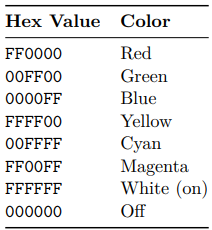
Any other hex value is treated as a custom color.
POST /brightness
Set brightness to an absolute value.

curl -X POST http://localhost:5383/brightness \
   -H "Authorization: Bearer luxafor" \
   -H "Content-Type: application/json" \
   -d ’{"brightness": 75}’
POST /brightness/increase
Increase brightness by a step value. Clamped to 100.

curl -X POST http://localhost:5383/brightness/increase \
   -H "Authorization: Bearer luxafor" \
   -H "Content-Type: application/json" \
   -d ’{"step": 10}’
POST /brightness/decrease
Decrease brightness by a step value. Clamped to 0.
curl -X POST http://localhost:5383/brightness/decrease \
   -H "Authorization: Bearer luxafor" \
   -H "Content-Type: application/json" \
   -d ’{"step": 10}’
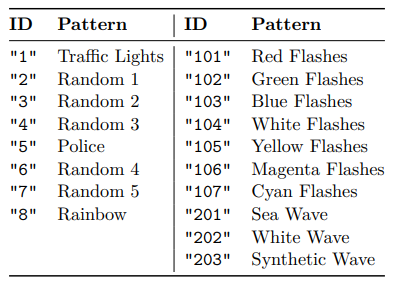
POST /pattern/play
Play a lighting pattern by its ID.

curl -X POST http://localhost:5383/pattern/play \
   -H "Authorization: Bearer luxafor" \
   -H "Content-Type: application/json" \
   -d ’{"id": "5"}’
Pattern IDs
Response
The server returns a minimal HTTP/1.1 200 OK response with a plain-text empty body for all valid requests. The response format:
HTTP /1.1 200 OK
Content-Length: 0
Content-Type: text/plain
Note: The response is sent immediately, regardless of whether the request body is valid or the token is correct. Authentication and request processing happen after the response is sent.
Behavior Notes
- Silent failures: Invalid JSON, wrong token, or unknown endpoints produce no error response — the request is silently ignored.
- No HTTPS: The server uses plain TCP. It is designed for local network use only.
- Color format: Send hex values without the # prefix (e.g., FF0000, not #FF0000).
- Brightness clamping: Increase/decrease operations clamp the result to the 0–100 range.
- Immediate restart: Changing port or token in Settings restarts the server instantly.
- Disabled by default: The incoming webhook server is off until explicitly enabled in Settings.
Example: Python Script
import requests

BASE = "http://localhost:5383"
HEADERS = {
    "Authorization": "Bearer luxafor",
    "Content-Type": "application/json",
}

# Set color to green
requests.post(f"{BASE}/color ", json={"color: "00FF00"}, headers = HEADERS)

# Set brightness to 50%
requests.post(f"{BASE}/brightness", json={"brightness": 50}, headers=HEADERS )

# Play police pattern
requests.post(f"{BASE}/pattern/play", json={"id": "5"}, headers=HEADERS)
Example: Node.js Script
const BASE = ’http://localhost:5383’;
const HEADERS = {
   ’Authorization’: ’Bearer luxafor’,
   ’Content-Type’: ’application/json’,
};

// Set color to red
fetch(‘${BASE}/color‘, {
   method: ’POST’, headers: HEADERS,
   body: JSON.stringify({ color: ’FF0000’ }) ,
});

// Increase brightness by 25
fetch(‘${BASE}/brightness/increase‘, {
   method: ’POST’, headers: HEADERS,
   body: JSON.stringify({ step: 25 }),
});