
Luxafor Signal AT Command Reference
Command Set v1.0
1. Introduction
The Luxafor Signal device is controlled through a text-based AT command interface. Commands can be sent over any of the following channels:
- USB CDC – virtual serial port over USB (TinyUSB CDC-ACM).
- Cloud WebSocket – commands relayed through the cloud server connection.
- Local HTTP server – commands submitted through the device’s local REST endpoint (available in AP and STA modes).
1.1 Command Format
Each command is an ASCII string terminated by a carriage return / line feed. Commands that take parameters use the = form:
AT+<NAME>                Execute / action command
AT+<NAME>?               Query ( get ) command
AT+<NAME>=<params>       Set command , parameters separated by commas
1.2 Responses
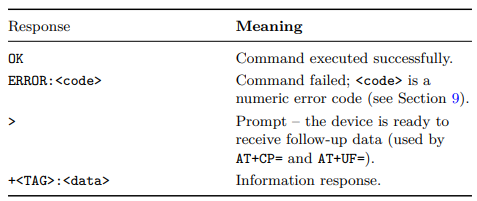

2. General Commands
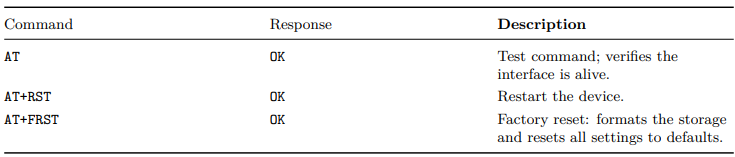
3. Device Information Commands

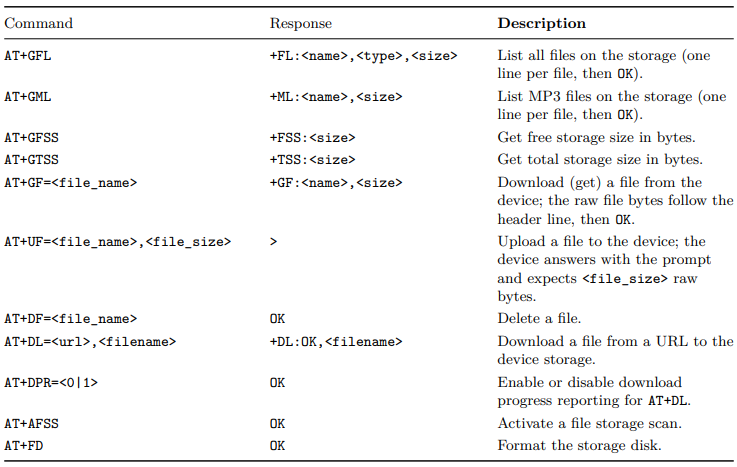
4. File and Storage Commands

5. LED Commands
The device has 12 addressable RGB LEDs. LED commands select LEDs with a decimal bit mask, <led_pins>: bit 0 (value 1) is LED 1 and bit 11 (value 2048) is LED 12, so 4095 selects all 12 LEDs. LEDs 1–6 (mask 63) form the right half and LEDs 7–12 (mask 4032) the left half. Bit 12 (value 4096) is a clear-others modifier: when set, every LED not selected by the mask is switched off (solid color) or reset to the background color (pattern step); when clear, unselected LEDs keep their current color. Colors are always six hex digits, RRGGBB.

5.1. Pattern Step Format
A custom pattern is a list of up to 40 steps. Each step is one line:
+CP:<led_bits>, <RRGGBB>, <speed>, <delay>
- <led_pins> – LED bit mask as described above. Add 4096 to reset all unselected LEDs to the background color (used for running-light effects).
- <RRGGBB> – target color of the selected LEDs.
- <speed> – fade rate from the previous color. 0 is effectively instant (about 13 ms for a full 0–255 change); every increment adds about 13 ms to a full-range fade (10 ≈ 140 ms, 80 ≈ 1 s, 150 ≈ 1.9 s).
- <delay> – minimum hold time of the step in milliseconds, counted from the start of the step. The next step begins once both the fade has finished and the delay has elapsed; 0 advances as soon as the fade completes
The step sequence plays from the first to the last line and then repeats according to the AT+PP= repeat count.
5.2. Built-in Patterns

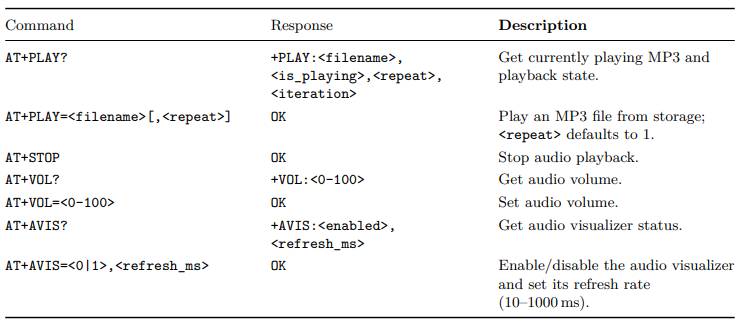
6. Audio Commands
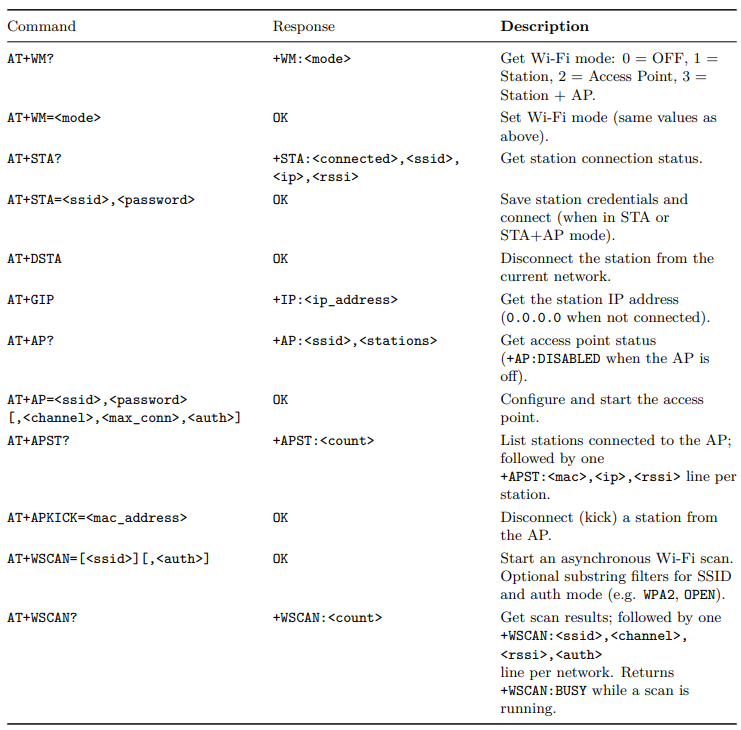
7. Wi-Fi Commands

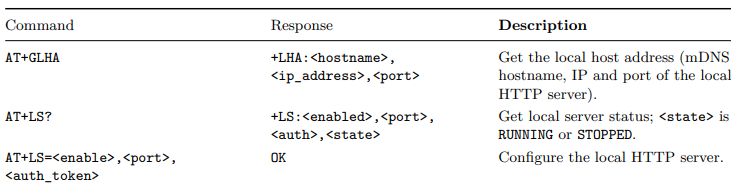
8. Local Server Commands

9. Error Codes
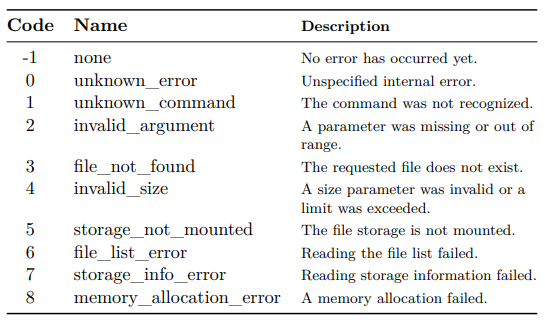
Failed commands reply with ERROR:<code>. The last error code can also be read back with AT+GLEC.
10. Examples
10.1 Basic Device Query
AT
OK
AT+GDN
+DN: luxafor_signal-3F2A1B
AT+GFV
+FV:1.0
10.2 Connecting to a Wi-Fi Network
AT+WSCAN=
OK
AT+WSCAN?
+WSCAN:2
+WSCAN:HomeNetwork,6,-52,WPA2
+WSCAN:Neighbor,11,-78,WPA/WPA2
OK
AT+STA=HomeNetwork,secretpassword
OK
AT+WM=1
OK
AT+STA?
+STA:1,HomeNetwork,192.168.1.42,-51
10.3 Setting a Solid Color
AT+SC=63,FF8000
OK
AT+SC?
+SC:63,FF8000
AT + SC =4097 ,0000 FF
OK
The last command lights LED 1 blue and switches every other LED off (mask 1 + clear others bit 4096).
10.4 Playing a Light Pattern
AT+DP=0
OK
AT+PP=1,255
OK
AT+PP?
+PP:1,255
AT+PP=0,1
OK
AT+CPD=+CP:4095,FF0000,5,10\r\n+CP:4095,000000,5,10
OK
AT+PP=1,5
OK
10.5 Playing an MP3 File
AT+GML
+ML:notify.mp3,48213
OK
AT+VOL=80
OK
AT+PLAY=notify.mp3,2
OK
AT+PLAY?
+PLAY:notify.mp3,1,2,1