
Luxafor Signal AT Command Reference Extended Edition with Examples
1. Introduction
The Luxafor Signal device is controlled through a text-based AT command interface. This extended edition documents every command with syntax, parameters, responses, and a worked example. A compact summary of the same command set is available in the short edition of this reference. Commands can be sent over any of the following channels:
- USB CDC – virtual serial port over USB (TinyUSB CDC-ACM).
- Cloud WebSocket – commands relayed through the cloud server connection.
- Local HTTP server – commands submitted through the device’s local REST endpoint (available in AP and STA modes).
1.1 Command Format
Each command is an ASCII string terminated by a carriage return / line feed. Command names are case-insensitive. Commands that take parameters use the = form:
AT+<NAME>              Execute/action command
AT+<NAME>?             Query ( get ) command
AT+<NAME>=<params>     Set command , parameters separated by commas
1.2 Responses
Every response is terminated with \r\n. The response shape depends on the command type:
- Set / action commands answer with a single OK on success.
- Single-value queries answer with one +<TAG>:<data> line. No trailing OK is sent after it.
- List queries (file lists, scan results, pattern lists) send one +<TAG>: line per item, followed by a final OK.
- Failures answer with ERROR: <code>, where <code> is a numeric error code (see Section 9). A few commands report textual errors in the form ERROR: <reason>; these are noted where they occur.
- Data transfers (AT+CP=, AT+UF=) answer with the prompt > and wait for follow-up data.

2. General Commands
2.1 AT — Test Command
Verifies that the command interface is alive. The device simply answers OK
AT
OK
2.2 AT+RST — Restart Device
Restarts the device. The OK is sent before the restart is performed, so the host should expect the connection to drop shortly afterwards.
AT+RST
OK
2.3 AT+FRST — Factory Reset
Resets all configuration to factory defaults, formats the storage, and restarts the device.
AT+FRST
OK

3. Device Information Commands
3.1 AT+GDN — Get Device Name
Returns the device name, which is also used as the mDNS hostname. The name is derived from the last three bytes of the device MAC address.
AT+GDN
+DN:luxafor_signal-3F2A1B
3.2 AT+GMN — Get Manufacturer Name
AT+GMN
+MN:SIA GREYNUT
3.3 AT+GID — Get Device ID
Returns the unique device identifier (the Wi-Fi MAC address as a 12-digit hex string).
AT + GID
+ID:A1B2C3D4E5F6
3.4 AT+GFV — Get Firmware Version
AT+GFV
+FV:1.0
3.5 AT+GHV — Get Hardware Version
AT+GHV
+HV:1.0
3.6 AT+GESPV — Get ESP-IDF Version
Returns the ESP-IDF version the firmware was built with.
AT+GESPV
+ESPV:v5.5.1
3.7 AT+GESPCT — Get Firmware Compile Time
AT+GESPCT
+ESPCT:Mar 10 2026 14:22:31
3.8 AT+GCHI — Get Chip Information
Returns chip model, silicon revision, core count, and a comma-separated feature list (possible features: WiFi, BT, BLE, EmbFlash, EmbPSRAM, ExtPSRAM).
AT+GCHI
+CHI:ESP32-S3,2,2 ,WiFi,BLE,ExtPSRAM
3.9 AT+GTEMP — Get Internal Temperature
Returns the internal chip temperature in degrees Celsius with one decimal place. On sensor failure a textual error such as ERROR: Failed to read temperature is returned.
AT+GTEMP
+TEMP:42.5
3.10 AT+GLEC — Get Last Error Code
Returns the most recent error code (see Section 9). -1 means no error has occurred yet.
AT+GLEC
+LEC:-1
3.11 AT+GLRR0 / AT+GLRR1 — Get Last Reset Reason
Return the last reset reason code for CPU core 0 and core 1 respectively.
AT+GLRR0
+LRR0:1
AT+GLRR1
+LRR1:14
4. File and Storage Commands
4.1 AT+GFL — Get File List
Lists all files on the storage, one +FL: line per file with name, type, and size in bytes, followed by a final OK.
AT+GFL
+FL:notify.mp3,file,48213
+FL:config.json,file,1024
+FL:logo.bmp,file,32768
OK
4.2 AT+GML — Get MP3 List
Lists only MP3 files, one +ML: line per file, followed by a final OK.
AT+GML
+ML:notify.mp3,48213
+ML:alarm.mp3,102400
OK
4.3 AT+GFSS — Get Free Storage Size
Returns free storage space in bytes.
AT+GFSS
+FSS:1439744
4.4 AT+GTSS — Get Total Storage Size
Returns total storage size in bytes.
AT+GTSS
+TSS:1572864
4.5 AT+GF — Get (Download) File
Syntax: AT+GF=<file_name>
Requests a file from the device. The device replies with the file name and size, then streams the raw file bytes, and finishes with OK.
AT+GF=config.json
+GF:config.json,1024
<1024 raw bytes follow>
OK
If the file does not exist, the device answers ERROR:3 (file_not_found).
4.6 AT+UF — Upload File
Syntax: AT+UF=<file_name>,<file_size>
Uploads a file to the device. The device validates the size, checks the available storage space, and answers with the prompt >. The host must then send exactly <file_size> raw bytes.
AT+UF=notify.mp3,48213
>
< host sends 48213 raw bytes >
OK

4.7 AT+DF — Delete File
Syntax: AT+DF=<file_name>
AT+DF=old_sound.mp3
OK
AT+DF=missing.mp3
ERROR:3
4.8 AT+DL — Download File from URL
Syntax: AT+DL=<url>,<file_name>
Downloads a file from an HTTP(S) URL to the device storage.
AT+DL=https://example.com/sounds/chime.mp3,chime.mp3
+DL:OK,chime.mp3
A failed download answers:
AT+DL=https://example.com/missing.mp3,missing.mp3
ERROR:0,DOWNLOAD_FAILED

4.9 AT+DPR — Download Progress Reporting
Syntax: AT+DPR=<0|1>
Enables (1) or disables (0) progress reporting for AT+DL downloads over the cloud connection.
AT+DPR=1
OK
4.10 AT+AFSS — Activate File Storage Scan
Requests a re-scan of the file storage.
AT+AFSS
OK
4.11 AT+FD — Format Disk
Formats the storage. All files are erased.
AT+FD
OK

5. LED Commands
5.1 LED Addressing
The Luxafor Signal has 12 addressable RGB LEDs on a single strip. Every LED command selects LEDs with a decimal bit mask, <led_pins>:
- Bit 0 (value 1) is LED 1, bit 1 (value 2) is LED 2, . . . , bit 11 (value 2048) is LED 12.
- 4095 (0x0FFF) selects all 12 LEDs.
- LEDs 1–6 (mask 63) form the right half and LEDs 7–12 (mask 4032) the left half of the strip.
- Bit 12 (value 4096) is a clear-others modifier. When it is set, every LED that is not selected by the mask is switched off (solid color) or reset to the background color (pattern step). When it is clear, unselected LEDs keep their current color
Colors are given as six hex digits RRGGBB, e.g. FF8000 is orange and 000000 is off.

5.2 AT+SC? — Get Solid Color
Returns the current solid color as an LED bit mask and an RRGGBB hex color.
AT+SC?
+SC:63,FF8000
5.3 AT+SC= — Set Solid Color
Syntax: AT+SC=<led_pins>,<color>
Parameters: <led_pins> is a decimal bit mask selecting which LEDs to set (e.g. 63 = all six LEDs); <color> is an RRGGBB hex value.
Setting a solid color stops any running pattern, applies the color immediately and saves it to the configuration. It is also the color the device returns to when a pattern finishes.
Set all LEDs to orange:
AT+SC=63,FF8000
OK
Set only LED 1 and LED 2 (mask 3) to blue; the other LEDs keep their color:
AT+SC=3,0000FF
OK
Set the right half green and switch the left half off (mask 63 + clear-others bit 4096):
AT+SC=4159,00FF00
OK
A missing or malformed parameter answers ERROR:2.
5.4 Pattern Step Format
A custom pattern is a list of up to 40 steps. Each step is one line in the same format that AT+CP? prints:
+CP: <led_bits>, <RRGGBB>, <speed>, <delay>
led_pins: LED bit mask (Section 5.1). Add 4096 to reset all LEDs not in the mask to the background color; this is what running-light effects use so that only one LED is lit at a time.
RRGGBB: Target color of the selected LEDs.
speed: Fade rate from the previous color to the target color. The LED driver moves each color channel by up to 5 units per update, and <speed> is the number of 0.25 ms ticks to wait between updates. A full 0–255 change therefore takes about 13 × (speed + 1) ms:

delay: Minimum hold time of the step in milliseconds, counted from the moment the step starts. The next step begins once both the fade has finished and the delay has elapsed. A delay of 0 advances as soon as the fade completes.
Steps play in order from the first to the last line; one pass through all lines counts as one repetition for AT+PP=.
5.5 AT+CP? — Get Custom Pattern
Returns the stored custom pattern, one +CP: line per step, followed by a final OK. If no pattern is stored only OK is returned.
AT+CP?
+ CP:63,FF0000,10,500
+ CP:63,000000,10,500
OK
5.6 AT+CP= — Set Custom Pattern (Prompted)
Syntax: AT+CP=<line_count>
Parameters: <line_count> is the number of step lines that follow, 1–39.
Begins a prompted custom pattern upload. The device stops any running pattern, discards the previously stored pattern and answers with the prompt >. The host then sends exactly <line_count> step lines, each terminated by a carriage return (\r). After the last expected line has been received the pattern is applied, saved to the configuration and the device answers OK.
AT+CP=2
>
+ CP:4095,FF0000,5,10
+ CP:4095,000000,5,10
OK

A line that does not parse is skipped (the last error code is set to 2) and the device keeps waiting for the remaining lines. Lines sent beyond <line_count> are ignored. A count of 40 or more answers ERROR:4; a non-numeric count answers ERROR:2.
5.7 AT+CPD= — Set Custom Pattern (Direct)
Syntax: AT+CPD=<pattern_lines>
Sets a custom pattern in a single command without the prompt step and works on every channel. The step lines are concatenated in the parameter and separated by the literal twocharacter sequences \r\n (backslash, r, backslash, n), so the whole command stays on one line. Any running pattern is stopped, the old pattern is replaced, and the new one is saved to the configuration.
AT+CPD=+CP:4095,FF0000,5,10\r\n+CP:4095,000000,5,10
OK
Up to 40 steps are accepted. A malformed line, or a parameter with no valid line, answers ERROR:2; more than 40 lines answers ERROR:4.
5.8 AT+PP? — Get Pattern Play Status
AT+PP?
+PP:1,255
Here 1 means a pattern is playing and 255 is the repeat count (255 = infinite loop). The values reflect the last AT+PP= command.
5.9 AT+PP= — Play / Stop Pattern
Syntax: AT+PP=<0-1>,<1-255>
Parameters: First value: 1 = play, 0 = stop. Second value: repeat count; 255 loops forever.
Play the stored pattern five times:
AT+PP=1,5
OK
Stop pattern playback (the device returns to the solid color):
AT+PP=0,1
OK
When the repeat count is exhausted the device also returns to the solid color by itself. If no custom pattern is stored, the device answers ERROR:4 (invalid_size); an out-of-range value answers ERROR:2.
5.10 AT+GDPL — Get Default Pattern List
Lists the 25 built-in patterns, one +DPL: line per pattern, followed by a final OK
AT+GDPL
+DPL:0,Police
+DPL:1,Traffic Lights
+DPL:2,Red Flashes
...
+DPL:24,Alert
OK


5.11 AT+DP= — Load Default Pattern
Syntax: AT+DP=<pattern_id>
Parameters: <pattern_id> is 0–24 (see AT+GDPL).
Copies a built-in pattern into the custom pattern slot, replacing the stored custom pattern, and saves it to the configuration. Playback is not started; use AT+PP= to play it. AT+CP? afterwards prints the individual steps of the loaded pattern. An unknown ID answers ERROR:2.
AT+DP=23
OK
AT+PP=1,255
OK
6. Audio Commands
6.1 AT+PLAY? — Get Playback Status
Returns the current MP3 file name, whether it is playing, the requested repeat count, and the current iteration.
AT+PLAY?
+PLAY:notify.mp3,1,2,1
When nothing is playing:
AT+PLAY?
+PLAY:NONE,0,0,0
6.2 AT+PLAY= — Play MP3 File
Syntax: AT+PLAY=<filename>[,<repeat_count>]
Plays an MP3 file from the storage. The repeat count is optional and defaults to 1.
AT+PLAY=notify.mp3
OK
AT+PLAY=alarm.mp3,3
OK
AT+PLAY=missing.mp3
ERROR:3
6.3 AT+STOP — Stop Playback
AT+STOP
OK
6.4 AT+VOL? — Get Volume
AT+VOL?
+VOL:80
6.5 AT+VOL= — Set Volume
Syntax: AT+VOL=<0-100>
AT+VOL=60
OK
AT+VOL=150
ERROR:2
7. Wi-Fi Commands
7.1 AT+WM? — Get Wi-Fi Mode
Modes: 0 = OFF, 1 = Station, 2 = Access Point, 3 = Station + AP.
AT+WM?
+WM:1
7.2 AT+WM= — Set Wi-Fi Mode
Syntax: AT+WM=<mode>
Switches the Wi-Fi mode. Cloud services are stopped when Wi-Fi is turned off and restarted when connectivity returns. In AP modes the local HTTP server is started automatically.
AT+WM=1
OK
AT+WM=0
OK
7.3 AT+STA? — Get Station Status
Returns connection flag, SSID, IP address, and RSSI.
AT+STA?
+STA:1,HomeNetwork,192.168.1.42,-51
When disconnected:
AT+STA?
+STA:0, ,0.0.0.0,0
7.4 AT+STA= — Connect to Network
Syntax: AT+STA=<ssid>,<password>
Saves the station credentials. If the device is already in STA or STA+AP mode it reconnects immediately; otherwise switch modes with AT+WM=1.
AT+STA=HomeNetwork,secretpassword
OK
AT+WM=1
OK
7.5 AT+DSTA — Disconnect Station
AT+DSTA
OK
7.6 AT+GIP — Get IP Address
Returns the station IP address, or 0.0.0.0 when not connected.
AT+GIP
+IP:192.168.1.42
7.7 AT+AP? — Get Access Point Status
Returns the AP SSID and the number of connected stations, or DISABLED when the AP is off.
AT+AP?
+AP:Luxafor-Signal-AP,2
AT+AP?
+AP:DISABLED
7.8 AT+AP= — Configure Access Point
Syntax: AT+AP=<ssid>,<password>[,<channel>,<max_conn>,<auth>]
Defaults: channel 6, maximum 4 connections, WPA2-PSK authentication.
Configures and starts the access point. The device switches to AP mode if it is not already in an AP-capable mode.
AT+AP=Luxafor-Signal-AP,ap-password
OK
AT+AP=Luxafor-Signal-AP,ap-password,11,2,3
OK
7.9 AT+APST? — List AP Stations
Returns the number of stations connected to the AP, followed by one line per station with MAC address, IP address, and RSSI, and a final OK.
AT+APST?
+APST:2
+APST:AA:BB:CC:DD:EE:01,192.168.4.2,-40
+APST:AA:BB:CC:DD:EE:02,192.168.4.3,-63
OK
7.10 AT+APKICK= — Kick Station from AP
Syntax: AT+APKICK=<mac_address>
AT+APKICK=AA:BB:CC:DD:EE:02
OK
7.11 AT+WSCAN= — Start Wi-Fi Scan
Syntax: AT+WSCAN=[<ssid_filter>][,<auth_filter>]
Starts an asynchronous Wi-Fi scan. Both filters are optional: the SSID filter is a case insensitive substring match, the auth filter matches the security mode name (e.g. WPA2, OPEN).
Read the results afterwards with AT+WSCAN?.
Scan everything:
AT+WSCAN=
OK
Scan for WPA2 networks whose SSID contains home:
AT+WSCAN=home,WPA2
OK
7.12 AT+WSCAN? — Get Scan Results
Returns the number of matching networks, followed by one line per network with SSID, channel, RSSI, and auth mode, and a final OK. While a scan is still running the device answers with a single +WSCAN:BUSY line.
AT+WSCAN ?
+WSCAN:3
+WSCAN:HomeNetwork,6,-52,WPA2
+WSCAN:CoffeeShop,1,-70,OPEN
+WSCAN:Neighbor,11,-78,WPA/WPA2
OK
While scanning:
AT+WSCAN?
+WSCAN:BUSY

8. Local Server Commands
8.1 AT+GLHA — Get Local Host Address
Returns the mDNS hostname, IP address, and port of the local HTTP server.
AT+GLHA
+LHA:luxafor_signal-3F2A1B.local,192.168.1.42,8080
8.2 AT+LS? — Get Local Server Status
Returns whether the server is enabled, its port, whether authentication is required, and the current run state (RUNNING or STOPPED).
AT+LS?
+LS:1,8080,1,RUNNING
8.3 AT+LS= — Configure Local Server
Syntax: AT+LS=<enable>,<port>,<auth_token>
Constraints: The port must be between 80 and 65535. Providing a non-empty token enables authentication.
AT+LS=1,8080,my-secret-token
OK
AT+LS=1,42,token
ERROR:2
8.4 AT+LT? — Get Auth Token
Returns the current local server authentication token. On failure a textual error in the form ERROR:<reason> is returned.
AT+LT
+LT:8f3a1c9e2b7d4056
8.5 AT+LT — Regenerate Auth Token
Generates a new random authentication token and returns it. Clients using the old token must be updated.
AT+LT
+LT:4e7b2d901a5c8f36
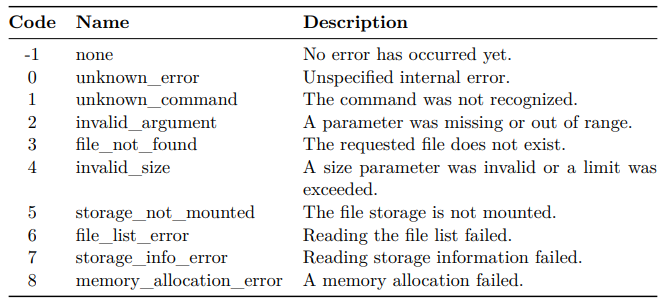
9. Error Codes
Failed commands reply with ERROR:<code>. The last error code can also be read back with AT+GLEC.
10. Complete Session Examples
10.1 First-Time Setup
AT
OK
AT+GDN
+DN:luxafor_signal-3F2A1B
AT+WSCAN=
OK
AT+WSCAN?
+WSCAN:2
+WSCAN:HomeNetwork,6,-52,WPA2
+WSCAN:Neighbor,11,-78,WPA/WPA2
OK
AT+STA=HomeNetwork,secretpassword
OK
AT+WM =1
OK
AT+STA?
+STA:1,HomeNetwork,192.168.1.42,-51
10.2 Uploading and Playing a Sound
AT+GFSS
+FSS:1439744
AT+UF=notify.mp3,48213
>
<host sends 48213 raw bytes>
OK
AT+VOL=80
OK
AT+PLAY=notify.mp3,2
OK
10.3 Creating and Playing a Light Pattern
Upload a two-step red flash over USB with the prompted command, play it forever, then stop it:
AT+CP=2
>
+CP:4095,FF0000,5,10
+CP:4095,FF0000,5,10
OK
AT+PP=1,255
OK
AT+PP?
+PP:1,255
AT+PP=0,1
OK
The same pattern over the cloud or local HTTP channel, using the direct command, followed by a built-in pattern:
AT+CPD=+CP:4095,FF0000,5,10\r\n+CP:4095,000000,5,10
OK
AT+PP=1,5
OK
AT+GDPL
+DPL:0,Police
...
+DPL:24,Alert
OK
AT+DP=0
OK
AT+CP?
+CP:4032,FF0000,3,20
+ CP:4032,000000,3,20
+ CP:4032,FF0000,3,20
+ CP:4032,000000,3,20
+ CP:63,0000FF,3,20
+ CP:63,000000,3,20
+ CP:63,0000FF,3,20
+ CP:63,000000,3,20
OK
AT+PP=1,255
OK